
Parallel AI Agents
Multiple coding agents working side by side
One workspace · Your coding agents
Run Claude Code, Codex CLI, Antigravity CLI, OpenCode, Kimi Code and Grok Build in parallel inside an Agentic Development Environment built for supervision.
Pro included during beta · macOS 12+ · Windows 10/11





Multiple coding agents working side by side
Full conversation history, never lose context
Live diffs and change tracking
Tasks your agents read, update, and complete
When your workflow depends on one AI agent at a time, the mental tax compounds. Switching windows, losing threads and repeating prompts quietly drains your time.
Window switching is wasting your time
// where was I?...
export async function refreshToken(req) {
  const session = await getSession(req)
  if (!session) throw new AuthError('expired')
  // TODO: did Claude already change this?
  return rotate(session.token)
}
Something broke while you were in another window.
✳ Claude Code · session expired 2h ago
 ▐▛███▜▌
▝▜█████▛▘
  ▘▘ ▝▝Claude Code v2.1.211
Fable 5 · Claude Max
~/dev/api
⠧ Waiting for your approval… (14 min)
  ❯ 1. Yes   2. Yes, don’t ask again
>_ OpenAI Codex (v0.48.0)
model: gpt-5.2-codex · ~/dev/web

> fix the login redirect…
■ session expired. context lost
 2
2 31
31 12Claude finished 12 min agoYou never saw it.
All visible at once · Multiple agents, 1 view
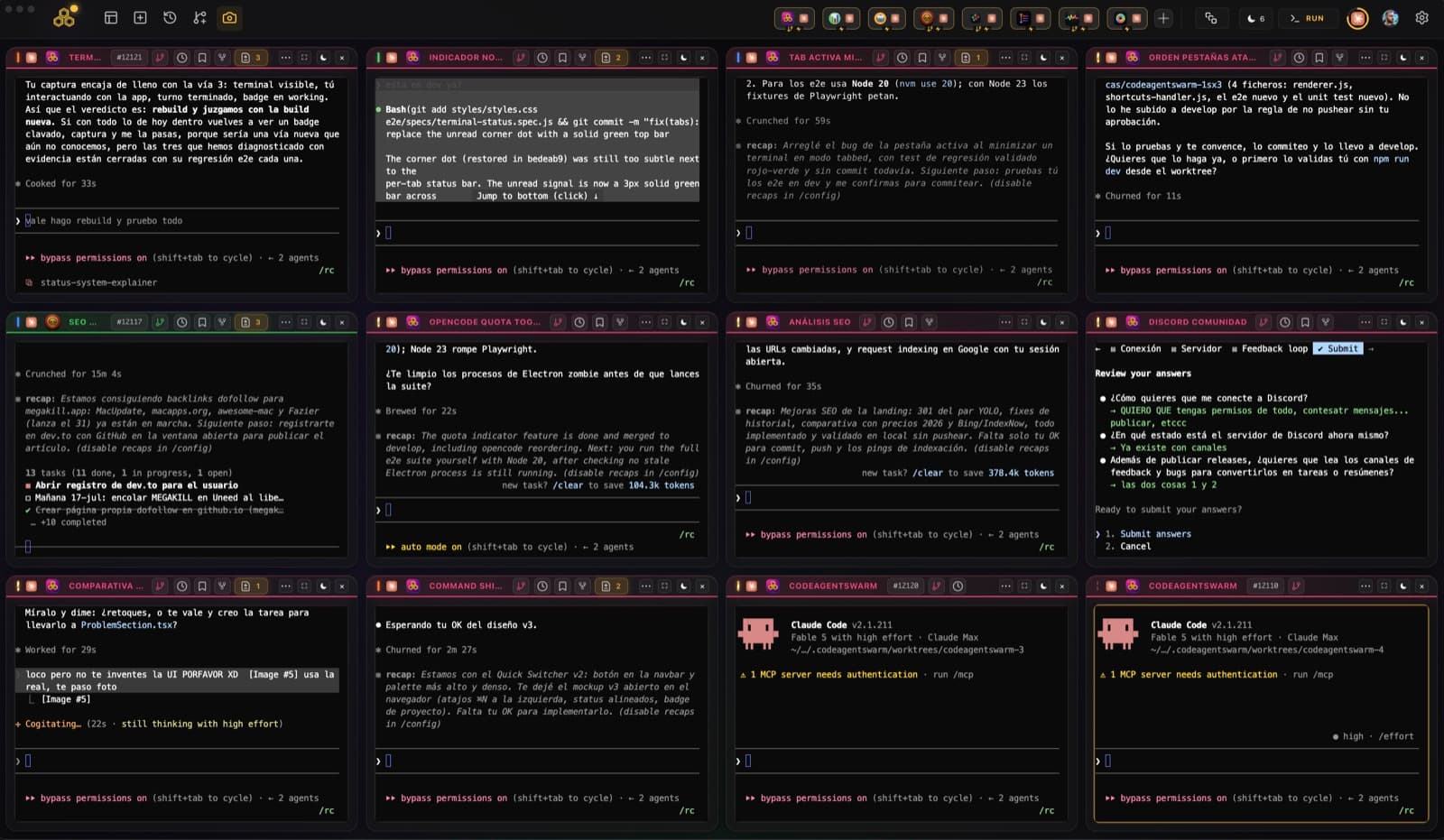
Every agent, every diff, every notification in one view. Nothing to hunt, nothing to miss.
One command center for all your AI agents. Run them in parallel, track their work, and never lose context again.
Each agent has its own project, context and task. Work on the frontend while another agent handles the backend, without losing track of either.
View guideCreate tasks, assign them to agents and review the changes when they finish. Agents read the board via MCP and update their progress automatically.
Stop babysitting agent windows. When an agent finishes, needs input or fails, CodeAgentSwarm alerts you so you can focus elsewhere.
View guideLive diffs while Claude edits. Dynamic titles showing what each agent is doing. Know exactly what changed without checking git afterwards.
View guideEvery decision, every explanation, every snippet - searchable. Recover context from 3 weeks ago in seconds. Never repeat a prompt because it 'got lost'.
View guideSkip confirmation prompts for routine operations but maintain guardrails for sensitive ones. Block pushes to protected branches, prevent destructive deletes, limit sensitive commands. You set the limits.
View guideMulti-agent control, multiple models, conversation history, kanban, Git and notifications.
Manage multiple AI agents simultaneously
One workspace for Claude Code, Codex CLI, Antigravity CLI, OpenCode, Kimi Code and Grok Build. Run them in parallel, mix vendors, and watch all of them from one place.
A catalog of integrations you enable per project. Your AI agent reads GitHub PRs, creates Jira tickets and updates Notion docs without leaving its workflow.
Click any integration to install
Supabase, PostgreSQL, Google Drive - all your data sources in one place.
Playwright and Puppeteer for testing, scraping, and automation.
Slack, Notion, GitHub - keep your team in sync automatically.
The agents you already pay for, running on your machine with your credentials. We just put them in one window.
Our vision for the future of AI-powered development
Expand beyond Claude to support multiple AI CLI agents.
CodeAgentSwarm runs natively on Windows.
Bringing CodeAgentSwarm to every developer's desktop.
You define the goal: the swarm plans, builds and ships it.
Expand beyond Claude to support multiple AI CLI agents.
CodeAgentSwarm runs natively on Windows.
Bringing CodeAgentSwarm to every developer's desktop.
You define the goal: the swarm plans, builds and ships it.
Community
See what's coming, report what's broken, vote on what's next, and trade real workflows with other builders.
See new features while they're still taking shape.
Put issues in front of the team, with the context we need to fix them.
Upvote what matters and influence what we build next.
See how other builders run their agents, then share what works for you.
Free to join · Lurk, ask, share, or vote.
Open CodeAgentSwarm and launch Claude Code, Codex, Antigravity CLI, OpenCode, Kimi Code or Grok Build side by side. Each agent runs independently, so you can work on different tasks or projects in parallel while seeing every status in one place.
CodeAgentSwarm keeps each project's agents, task board and conversation history together. You can switch between codebases without losing context or rebuilding your setup.
Yes. Live diffs show each agent's code changes as they happen. Dynamic agent titles show what Claude Code, Codex, Antigravity CLI, OpenCode, Kimi Code or Grok Build is working on, and file tracking records exactly what changed and when.
Yes. CodeAgentSwarm sends a desktop notification when any agent finishes a task, needs your input or encounters an error.
CodeAgentSwarm saves the full conversation history of every supported CLI across sessions. Search any past chat, decision, or code snippet instantly. Session history is fully searchable, so you never lose context or have to repeat explanations.
Yes. Visual permission settings control the files and actions available to each agent. You can approve sensitive operations while Turbo Mode handles the safe routine ones within the limits you set.
Yes. CodeAgentSwarm includes full MCP integration with a built-in MCP marketplace. Connect any of the six supported AI CLI agents to GitHub, Notion, Slack, Supabase, Brave Search, Playwright, PostgreSQL and more. MCP tools extend what your agents can do.
Yes. CodeAgentSwarm keeps searchable conversation history across agent sessions, shows each agent's changes in real time and ties every session to its project. Past work stays easy to find and resume.
tmux manages windows. CodeAgentSwarm manages agents: task state, notifications when they finish, live diffs, per-project history and configurable permissions. If you just need to split your screen, tmux works fine. If you want to know what each agent is doing and never miss a thing, you need CodeAgentSwarm.
Yes. Each agent session is an independent process, so Claude Code and Codex CLI can run at the same time. Pick the agent for each session and run as many as your plan allows.
Yes. CodeAgentSwarm runs Antigravity CLI (agy), Google's official successor to the retired Gemini CLI, alongside Claude Code, Codex CLI, OpenCode, Kimi Code and Grok Build, with shared notifications, searchable history and live diffs for every agent.
Yes. A single CodeAgentSwarm workspace can run Claude Code, Codex CLI, Antigravity CLI, OpenCode, Kimi Code and Grok Build side by side. Use the best agent for each task and supervise all of them from one place.
An AI CLI agent swarm is several independent AI coding CLI agents (such as Claude Code, Codex, Antigravity CLI, OpenCode, Kimi Code and Grok Build) running in parallel in one place, with shared visibility, notifications and history. CodeAgentSwarm is the desktop workspace built to run and supervise that swarm.
Yes. CodeAgentSwarm runs OpenCode alongside Claude Code, Codex CLI, Antigravity CLI, Kimi Code and Grok Build. Add one or several OpenCode sessions to the same swarm.
Yes. Kimi Code CLI by Moonshot is a first-class agent in CodeAgentSwarm, alongside Claude Code, Codex CLI, Antigravity CLI, OpenCode and Grok Build. Pick Kimi Code from the launcher like any other agent and it gets the same notifications, searchable conversation history and live diffs. You can run a full swarm of Kimi Code sessions or mix it with the other CLIs.
An Agentic Development Environment is a workspace built around delegating software tasks to AI coding agents, running them in isolated or parallel sessions and reviewing their results. CodeAgentSwarm is an ADE: it lets you direct Claude Code, Codex CLI, Antigravity CLI, OpenCode, Kimi Code and Grok Build from one place while keeping tasks, notifications, history, permissions and live diffs visible.
Yes. CodeAgentSwarm runs xAI's Grok Build CLI (the grok command) as a first-class agent, so you can supervise several Grok Build agents alongside Claude Code, Codex or any other supported CLI. You install and log into Grok Build yourself, and CodeAgentSwarm adds desktop notifications, live diffs for every agent, searchable history and per-project switching.
Practical guides to get the most out of it
Run all your AI coding agents from one visual command center, with live status, notifications and searchable conversation history.
Already using Claude Code, Codex, Antigravity CLI, OpenCode, Kimi Code or Grok Build? It just works. Install and open.
Available for
 macOS
macOS Windows
First time installing? You might need to right-click and select "Open" to bypass Gatekeeper.